Saturday, 5 November 2011

New Getting Started Videos for SketchUp

Our Official Training Videos have been responsible for teaching literally millions of people to use SketchUp. Concepts of SketchUp, the first video in the old series, has been viewed over 7 million times. Collectively, people have spent something like 40 years watching that video. That’s a lot of popcorn.

As popular as they were, our old videos were getting a little long in the tooth; they showed SketchUp 6. We decided that they should be remade, so we locked Tyson in a closet with a computer and a pile of army rations. It worked—our new training videos are not only current, they’re gorgeous. With Tyson’s scripts and visuals (and Alex’s melodious narration), getting started with SketchUp has never been easier. Here they are, in order:


One more thing: We didn’t stop at the videos. We gave the whole SketchUpVideo YouTube Channel a facelift. With helpful navigation menus in the upper-left corner, a new masthead and a big, blue Download button right at the top, SketchUp’s home on the world’s biggest video sharing site is now a whole lot lovelier. Pop on over when you get a chance.

Via Google

Saturday, 22 October 2011

Beautiful Time-lapse Videos by Dustin Farrell

Park Royal by Crew West


Landscapes: Volume One


Landscapes: Volume Two


Sedona HDR time lapse


For More of his Time-lapse videos check out his Vimeo profile.

Monday, 12 September 2011

My New and Improved HDR Workflow Video

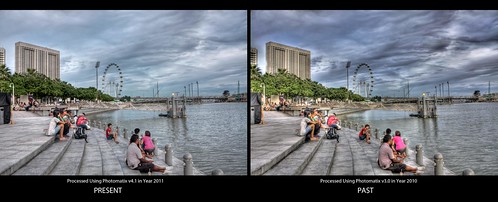
A year on and due to vast improvements in Photomatix (from version 3 to version 4.1) as well as my knowledge of HDR Photography and its digital technique, I have changed the way I process my HDR photos. Now I save my braketed RAW files to 16bit TIFF files, Merge and Tonemap in Photomatix and Post Process in Photoshop. video below demonstrates this in detail:


Image after processing can be viewed HERE

Saturday, 27 August 2011

Improvement in my HDR Procesing and Photomatix

Showing the improvement in HDR Processing and the new version of photomatix.

Thursday, 7 July 2011

Anyone on Google +


You can add me on Google+ HERE.

Wednesday, 15 June 2011

Project Neon – Revit 2012

image

Be sure to check out Project Neon for Revit 2012.

http://neon.labs.autodesk.com/index.aspx

Project Neon has recently been updated to allow you to do cloud based rendering from Revit 2012. Just sign up, download & install the Revit 2012 plugin & you are good to go! I threw a couple of render at the system today & I am very impressed. It will even notify you once you render is complete!

image

Once the plugin is installed, you will find another tab which allows you to publish your render online or to view your render gallery.

image

The images can be rendered using all the normal settings with Revit. You simply click the “render online” button, pick your 3d view you want, set the image quality, then the image size, followed by the File format. You have three file formats to choose from PNG, JPG & TIF ; then just hit the “Start Rendering” button.

image

Your file is the published to the cloud where a host of super computers rip through the render in no time at all. Once the render is complete, you are alerted via email. Login to Project Neon & you can view & download your completed render from there. You will need to set up the exposure settings on your host workstation before hand but that's a small price to pay for the speed of rendering. Be sure to give it a go! This is genuinely an exciting development for the Revit user & harness the essence of cloud based computing.

image

Via Revit Blog


Tuesday, 7 June 2011

Automatically Save Your Work With PsdAutoSaver

We’ve all been there. You’ve been awake all night working on an
amazing project. Everything is going perfectly, the design looks great,
you’re proud of the job you’ve done, and then disaster strikes.
Photoshop crashes and you lose all your work. Your first thoughts are
“when was the last time I saved?” After restarting Photoshop and opening
the file, you realize that it was hours ago and that you were putting
so much effort into your design that you completely forgot to save.
Wouldn’t it have been nice if Photoshop would have saved your work
automatically along the way? Now it can!


An auto save feature has been something that many Photoshop users
have been asking Adobe for, for quite some time. While there isn’t a
native solution yet, the guys at Electric Iris have a nice workaround. A
plugin that will save your work automatically.


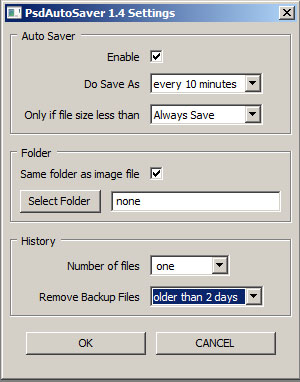
PsdAutoSaver helps protect your work by automatically saving the
files that you’re working on to one or more backup files. In the event
that your computer crashes, freezes, or loses power, your work is
protected.


Video Demonstration


You can see this plugin in action below.


You can download a 30-day free trial of PsdAutoSaver from here. Give it a try and see what you think.


Note: while this plugin works for both PC and
Mac, it only works on Macs using Photoshop CS5 and above. PC users can
use this plugin using Photoshop 7 and up in both 32 and 64 bit versions.

Via PSD Tutes

Thursday, 26 May 2011

My first Time Lapse Photography Experiment

Check out my first experiment on time lapse photography:


I used my canon eos 450D and a timer remote set to shoot every 10 seconds for approximately 2.5 hours. For Post processing I used Adobe Lightroom and used LrTimelapse which is the tool to make professional looking time lapse movies together with Adobe Lightroom. It's a great tool for timelapse photography and has features like deflickering to reduce the flickering effect that occurs with time lapse photography. To check out LR Timelapse visit lrtimelapse.com I also, used Sony Vegas to slow the video down. The origional video straight from Lightroom can be found HERE.

Tuesday, 24 May 2011

ARmedia Augmented Reality Plugin 2.1 for SketchUp

Inglobe Technologies has just announced that version 2.1 of ARmedia Augmented Reality Plugin for SketchUp is now available. Among the new features:

  • Video/Audio Objects: support for the creation of 3D objects that allow interactive media files playback.
  • Soundtracks: support for audio playlist management which will play in background during the AR Visualization.
  • Customizable Interactions: support for definition of interactions with 3D objects during the AR Visualization.
  • Save/Load Custom Configurations: possibility to save/load many configuration options such as Markers’ Library and 3D Scene Setup.
  • Extended Animations support for 3ds Max: e.g. skinning and morphing


For more information, visit the site linked above or their blog.

Via Daily Catchup

Monday, 23 May 2011

Book: 100 ways to Photography - The Expert Advice


100 ways to Photography - The Expert Advice is a new book by Choo Meng Foo. The book is about photography and reveals 100 ways to capture and explore those amazing moments. Its about exploring beyond the limits of the camera, touching on increasing the photographers' sensibilities, courage and humility. A book for those who want to go beyond the technical and technique. Learn and understand the relationship between you and your camera.

Here is a video by the author revealing more about the book:


To Purchase the book visit lulu.com
and to download the Preview Book Click HERE. You can also purchase the book through Blurb or
now available in Amazon.

About the Author: Choo Meng Foo

Choo Meng Foo has been a photographer since he was fifteen years old. At sixteen, he won an overall best print (student section) for Asian Salon competition and his work got exhibited in the National Musuem, National University of Singapore and abroad. He went on to shoot for Tennis and Squash circles. Most recently his work was featured in Aisan Geographic Magazine, Silverlining, Wave, and One. his subject interest includes theatrical performance, portraiture, cityscape and anthropods. He has also given seminars and workshops on photography and digital post processing techniques.

Vist Choo Meng Foo's Flickr and Profile for further information.

Sunday, 22 May 2011

Autodesk 123D – A new 3D tool in BETA

123D is a free solid modeling software program based
on the same Autodesk technology used by millions of designers and
engineers worldwide. Not an engineer? No problem, with Autodesk 123D
you can design precise and makeable objects using smart tools that let
you start with simple shapes and then edit and then tweak them into
more complex shapes.


This new application has its focus on 3D printing, paper models and engineering prototyping.


http://www.123dapp.com/


Via burnstudio

Sunday, 8 May 2011

Tgi3d : plugins for sketchup


Checkout Tgi3d which has developed a few plugins for sketchup.

  • State-of-the-art plugins for Google SketchUp!
  • Enables you to create accurate 3D models efficiently, either with or without photographs.
  • These SketchUp plugins are free-form 3D modeling softwares, which allow you to create organic 3D models.
  • Simple yet powerful calibration method!
  • High quality photogrametry!
  • NEW: Smart texturing!
  • Available for both Windows and Mac OS X systems!
Visit: Tgi3d for further info. Facebook page can be found HERE.

Time Lapse Video


Scenes taken from Tenerife, more than 2,000 meters above sea level and over a year to capture all possible shades, clouds, stars, colors from a unique landscape and from one of the best skies on the planet.
First in a series of videos nocturnal and crepuscular Time Lapse taken in the Canary Islands trying to capture the beauty of each island.
To capture the natural movement of the earth, stars, clouds, sun and moon TimeLapse technique was used, Dolly vertical and horizontal rails, spindles with horizontal and vertical movements. HDR data collection.

Visit: elcielodecanarias.com

Wednesday, 4 May 2011

An Introduction to Sustainable Design in BIM (video download links)

Here are some direct links to download the videos detailed on this page.


To download them all quickly, use DownThemAll.


To play the FLV files, you may want to use Media Player Classic Home Cinema.


Sustainable Cities

http://download.autodesk.com/us/bim/video/overview/sustainable_cities_video_800x450.flv


Autodesk Revit Products for BIM-Enabled Sustainable Designhttp://www.aec-projects.com/autodesk-revit-products-for-sustainable-design/content/intro.flv

http://www.aec-projects.com/autodesk-revit-products-for-sustainable-design/content/ch_01.flv

http://www.aec-projects.com/autodesk-revit-products-for-sustainable-design/content/ch_02.flv

http://www.aec-projects.com/autodesk-revit-products-for-sustainable-design/content/ch_03.flv

http://www.aec-projects.com/autodesk-revit-products-for-sustainable-design/content/conclusion.flv


Conceptual Energy Analysis Screencast

http://c0377931.cdn2.cloudfiles.rackspacecloud.com/intro.flv

http://c0377931.cdn2.cloudfiles.rackspacecloud.com/ch_01.flv

http://c0377931.cdn2.cloudfiles.rackspacecloud.com/ch_02.flv

http://c0377931.cdn2.cloudfiles.rackspacecloud.com/ch_03.flv

http://c0377931.cdn2.cloudfiles.rackspacecloud.com/ch_04.flv

http://c0377931.cdn2.cloudfiles.rackspacecloud.com/ch_05.flv

http://c0377931.cdn2.cloudfiles.rackspacecloud.com/conclusion.flv


Optimizing Building Designs with Autodesk Revit MEP & Autodesk 3ds Max Design

http://www.aec-projects.com/optimizing-building-designs/content/intro.flv

http://www.aec-projects.com/optimizing-building-designs/content/ch_01.flv

http://www.aec-projects.com/optimizing-building-designs/content/ch_02.flv

http://www.aec-projects.com/optimizing-building-designs/content/ch_03.flv


http://www.aec-projects.com/optimizing-building-designs/content/ch_04.flv

http://www.aec-projects.com/optimizing-building-designs/content/ch_05.flv

http://www.aec-projects.com/optimizing-building-designs/content/ch_06.flv

http://www.aec-projects.com/optimizing-building-designs/content/ch_07.flv

http://www.aec-projects.com/optimizing-building-designs/content/ch_08.flv

http://www.aec-projects.com/optimizing-building-designs/content/conclusion.flv


Revit MEP Sustainable Design - 2010 

http://aec-projects.com/mep-engineering-solutions/intro.mp4

http://aec-projects.com/mep-engineering-solutions/ch_01.mp4

http://aec-projects.com/mep-engineering-solutions/ch_02.mp4

http://aec-projects.com/mep-engineering-solutions/ch_03.mp4

http://aec-projects.com/mep-engineering-solutions/ch_04.mp4

http://aec-projects.com/mep-engineering-solutions/ch_05.mp4

http://aec-projects.com/mep-engineering-solutions/ch_06.mp4

http://aec-projects.com/mep-engineering-solutions/ch_07.mp4

http://aec-projects.com/mep-engineering-solutions/ch_08.mp4

http://aec-projects.com/mep-engineering-solutions/outro.mp4


Via What Revit Wants

Thursday, 28 April 2011

Auckland buddhist temple

buddhist temple by Ankit_
buddhist temple, a photo by Ankit_ on Flickr.

Wednesday, 27 April 2011

boundaries

boundaries by Ankit_
boundaries, a photo by Ankit_ on Flickr.

photo from my trip to auckland and northland in the easter break.

view more photos here: http://bit.ly/f7D8MO

Thursday, 7 April 2011

The Three Classicists


A 4 meter x 3 meter drawing that was done in one day at the Royal Institute of British Architects by Ben Pentreath, George Saumarez Smith and Francis Terry

Time Lapse Film by Ben Moore

Music by Aphex Twin

Tuesday, 5 April 2011

Bintan, Indonesia

IMG_5732 [uploads] by Ankit_
IMG_5732 [uploads], a photo by Ankit_ on Flickr.

Photo from my trip to Bintan, Indonesia.

Check out More here: http://bit.ly/f0hIL7

Thursday, 31 March 2011

Sunset at Manila Bay

manila_baywalk by Ankit_
manila_baywalk, a photo by Ankit_ on Flickr.

Photo of sunset/dusk taken by me during my trip to the Philippines. See more photos of Manila Trip here:

http://bit.ly/ghQGhS

Wednesday, 23 March 2011

Organic modeling with the Artisan plugin

SketchUp plugin wizard Dale Martens (a.k.a. Whaat) recently released an amazing and incredibly useful organic modeling toolset called Artisan. Based on Dale’s popular Subdivide & Smooth tools, Artisan is perfect for people who want to use SketchUp to model organic shapes and terrain features. Artisan includes a set of “deformation” tools that allow you to sculpt, smooth, flatten, pinch and apply textures just like you would with a brush.

The toolbar for Dale Martens' Artisan Organic Toolset for SketchUp


Eric Lay modeled Patrick Beaulieu's "Bobby Bubble" character, then rendered him (her?) with Twilight Render.


Use Artisan's Sculpt tools to "paint" 3D deformation onto surfaces.

You can add or reduce polygon complexity in your model, allowing for more or less detail. There’s also a suite of vertex tools that you can use to model based on controlling vertex points. Oh—and did I mention that it’s a ton of fun to use? Have a look at some of the features yourself...

Popout

As anyone at the office can tell you, I’m no artist or designer, but I thought I would give the Artisan tool a try over the weekend. Below is something that I whipped up; not too shabby for an hour’s worth of work.

I modeled this hamburger. Er, yum?


If slimy, unappetizing hamburgers aren’t your thing, no worries. It’s not a stretch to see how the Artisan tools might be applied to a whole range of different markets and use cases: character design, product design, environmental design, construction, civil engineering, architecture and, of course, landscape architecture.

Peter Stoppel modeled this scooter.

Peter also modeled this wedge of landscape.


Artisan is also incredibly useful for freeform terrain modeling. This model is by Daniel Tal.

For more information and video tutorials on the Artisan Organic Toolset for SketchUp, check out this website. You’ll also find a great writeup on the Artisan tools in SketchUcation’s February issue of the CatchUp news magazine.

Thank you to Dale for building this great plugin, and special thanks to Eric Lay (a.k.a. Boofredlay), Peter Stoppel (a.k.a. Solo) and Daniel Tal for your great graphics.

Via Google

Thursday, 17 March 2011

RenderWeb | render animations directly within Facebook


RenderWeb is a new platform that allows friends and communities to share
computational resources to render animations directly within Facebook. Once the
projects are rendered, the animations are available for the entire community to
watch and tag.

Click HERE to Read More

Tuesday, 15 March 2011

the Advanced Camera Tools for Sketchup 8


The Advanced Camera Tools plugin lets you work with real-world cameras in your SketchUp Pro 8 models. Cameras you create with the ACTs provide precise controls for settings like Focal Length, Aspect Ratio and Image Width, which allows you to accurately preview real camera shots right inside SketchUp.

Here's a video showing the plugin:


here’s some of what you can do with the Advanced Camera Tools:

Place cameras in your model and look through them to preview your shots.


Choose from dozens of pre-configured camera types, or create your own.


Position and aim your ACT cameras using familiar moves like Pan, Tilt, Roll, Dolly, Truck and Pedestal.


Set the Focal Length of any camera to simulate a large number of physical lenses.


Look through your ACT cameras to preview Aspect Ratio and Safe Zones for the shots you’re planning.


Toggle on and off all of your ACT cameras’ frustums to clearly see what is—and isn’t— visible in your shots.

The Advanced Camera Tools work on both Windows and Mac computers running SketchUp Pro 8. The plugin itself is a free download; you can get it here: Windows | Mac OS X

Via Google Sketchup Blog

Thursday, 10 March 2011

RENDERLights for SketchUp


3D Render Announces the Release of RENDERLights for SketchUp

RENDERLight for SketchUp is the fastest and easiest to use real-time
Radiosity and light simulation engine in the architectural industry.


Helsinki, Finland – March 8, 2011–Leveraging over a decade of
visualization and software development experience, 3D Render today
announced the release of RENDERLights for SketchUp. Building upon their
widely successful RENDERLights engine, architects, visualization
artists and designers now have access to a real-time virtual reality
engine on the popular Google SketchUp platform.


“We are very excited to get RENDERLights for SketchUp into the hands of the design community”, said Pauli Jantunen
Development Manager for 3D Render, “The speed of the design process has
changed dramatically and we’ve developed the first virtual reality
engine that will truly democratize visualization throughout the design
process.”


Boasting an incredibly powerful and simple user interface,
RENDERLights for SketchUp was designed from the ground up with the
design industry in mind. In an increasingly competitive market, it has
become critically important to quickly and easily communicate design
intent with internal stakeholders and customers. RENDERLights for
SketchUp brings real-time to the masses with unprecedented real-time
performance, radiosity lighting simulation, Google 3D Warehouse
integration and the shortest and easiest learning curve of any virtual
reality application on the market.


“For me it was ideal to see and present the architectural design and related urban planning with a portable digital model” said Ilari Schouwvlieger, Chairman of Board at BMZ Invest. “It aided us to promote the design for city officials, hotel operators and investors.”

RENDERLights for SketchUp shares many of the advanced features and
functionalities of the core RENDERLights engine including: texture
baking, realistic environments, animation systems, sun and shadow
simulations, real-time bloom water and raytraced reflections, 3d
presentations, large model handling and their one click (Click ‘N’Go)
functionality.


For more information and to get picture material on RENDERLights for SketchUp, please visit: http://www.renderlights.com/?p=802


Product Availability


RENDERLights for SketchUp is distributed as a standalone license and
is available for the limited introductory price of €299 per year.
Purchases can be made from the RENDERLights website at: http://www.renderlights.com/ and from select international resellers.


About 3DRender


3D Render is one of the leading visualization offices in
Scandinavia. Based in Helsinki, Finland, 3D Render has over a decade of
experience in visualization and software development. Their products
range from simple 3D imagery and videos, to complex virtual models and
web based applications. 3D Render specializes in the development of new
and innovative ways to help decisions makers in the design industry use
visualization tools.


Via Renderlights