Wednesday, 22 July 2009

New YouTube Channel on Ecotect

Ideate, a leading Autodesk reseller in the Pacific Northwest has started an Ecotect Channel on YouTube. So far there are these two tutorials on weather files and artificial lighting. Stay tuned for more … If you are new to Ecotect I recomend seeing the Ecotect overview presentation done by Ideate or check out Practical Sustainable Design Workflows with Ecotect and Revit at the Autodesk University Classes (sign up required)


Via Blgsim


Tuesday, 21 July 2009

In-Revit Solar Simulation Tool available

solaraddin

This is an exciting though expected development that the technology behind Ecotect will eventually be integrated right into Autdesk’s core BIM application Revit. Let’s hope this is the first of many integrated building performance tools.

Use this Solar Radiation Technology Preview to analyze the effects of solar radiation on various surfaces of your conceptual building model. The add-in uses conceptual massing elements from Revit models and the Autodesk Ecotect insolation analysis engine to calculate the amount of solar radiation hitting the surfaces of the massing shapes. This add-in works with Revit Architecture 2010 Update Release 1 and Revit MEP 2010 Update Release 1.
Go to Autodesk Labs to download the add-in. The archive includes a PDF “getting started” guide.

See this video for an overview.


Via Blgsim


Earn Money with your best Revit® Families

There are thousands of free and paid Content available on the Market, but our research and the daily feedback from our Customers and Website Visitors shows a huge lack of really High Quality Revit® Content combined with personal unique Service. And this is exactly what we provide to the Revit® Community and that make the difference and the Success of the Revit® Content Platform.

But it’s all about the best Revit® Content and therefore we search for the best Revit® Content Creator available to join our Content Partner Program with the aim to become the first choice for Revit® Users and their need for High Quality Revit® Content.

This Content Partner Program is different to other Content sale opportunities because for us there is not the sale the most important - The most important are you as Content Partner and the Revit® User.

We provide the Platform that every single Revit® User can get your best Revit® Content and how we do it makes the real difference to all existing Revit® Platforms.

How you can benefit ?
  • Registration as Revit® Content Partner is absolute FREE
  • You pick the price
  • You get 70% of sales revenue
  • You get payed monthly (via check or on your PayPal Account)
  • You receive constantly information, which Revit® Content is missing out there
  • You receive constantly feedback from Revit® Users
  • No charge for free Content
  • No credit card fees
  • No hosting fees
  • No marketing fees

We really want you to concentrate on the creation of your best Revit® Content and therefore we do everything to make the distribution of your Content as easy as possible for you and at the same time we do everything to provide the Revit® User with all detailed information they need to decide which Revit® Content is the best for them.

Click HERE to read more


SketchUp goes to the Moon!

With the launch of Moon in Google Earth today, you can now explore our nearest celestial neighbor from within Google Earth. Beginning in 1959, we began to send probes and landers to the lunar surface, and most of them remain there to this day.


Many of these objects have been modeled in Google SketchUp, and are based on drawings, photographs, and dimensions. One model that has a prolific presence on the Moon comes from Google 3D Warehouse model contributor, Pagan. This user modeled the Apollo Lunar Module and it is featured at each of the Apollo mission landing sites, as well as in the guided tours.

To view these models in Google Earth, first switch to Moon via the planetary drop-down menu at the top of the screen.


Next, expand the "Moon Gallery" in the left Layers panel.

From here you can virtually visit a variety of artifacts, spacecrafts, and mission landing sites by double-clicking on any of the models listed. Here are some examples of what you can find:


Apollo 11 Landing Site


Lunokhod 1 and Luna 17

Lunar Rover

You can also view these models in SketchUp by downloading them from our Moon Objects collection in the Google 3D Warehouse. Happy exploring!

Via Google

Monday, 20 July 2009

Smart Render Graphics, the real interactive image file format.


With Smart Render Graphic plug-in for 3ds Max you can generate interactive SRG files. Unlike other raster file formats available in the market such as JPG, BMP, PNG and GIF formats, SRG images allows you to have the following features:

Hot spots, multi-materials, hyperlinks, data fields, and much more.

Click HERE to Read More

To download the plugin click HERE or visit the site

Creative Clothing made from Condoms


We’ve heard of protective gear, but this is ridiculous! Or is it? With creative clothing made from condoms popping up all over the internet in such versatile and surprisingly beautiful styles, we have to wonder - could condom garments be an innovative new eco-fashion trend? And would you actually be willing to wear prophylactic couture?


Read More at Inhabitat


Sunday, 19 July 2009

ResoNet

resonet

Designed by Mark Francis Tynan & William Hailiang Chen, ResoNet visualises the resonant frequencies inherent in the natural environment, via the interaction of the public and surrounding elements detected by a LED net. By using Low-Fi techniques ResoNet creates a cascade of light triggered by the vibrations detected across the structure.

ResoNet’s tensile web structure is stretched across a space, like a spider web. A series of vibration sensors & LED circuit components are fixed at key intersections on the tensile network, to detect minute vibrations as a result of human and natural activity.

Microsoft Word - Chen_Tynan_Proposal_Fred07.doc

Be it a brush of a hand, or a passing breeze, the energy is converted into light that resonates across the structure, immersing the public in a cascading visual of flashing LED’s

Via Interactive Architecture


Genuine Fractals Review

Genuine Fractals is a great product that allows you to dramatically increase the size of your image. This comes in handy for all sorts of situations, including detail enhancement, printing big prints, post-processing, and advanced cropping.

Click HERE for the Review


Via Stuck in Customs

How to Use Camera Raw for Jpeg and Tiff files in Photoshop

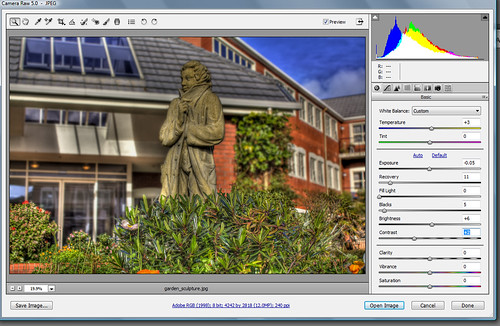
cam_raw1

I never knew you could use camera raw 5.0 for jpeg's and tiff files until now. Here's a quick tutorial on how to setup preferences to use jpegs and tiff files in order to open up the camera raw 5.0 interface in photoshop CS3 and CS4. I'm not sure if this works in other photoshop versions. The tutorial below has been carried out in CS4.

Firstly, for those who don't know what camera raw 5.0 is: It's pretty much an interface which opens up your RAW files to enable you to change and play with various sliders as shown in the image above. Sliders include functions such as exposure, recovery, backlight, etc. Photoshop has other functions such as Levels and Curves for Jpegs and Tiff files but using the camera raw interface, it may be easier to touchup some of those photos that came out under or over exposed.

Step 1:

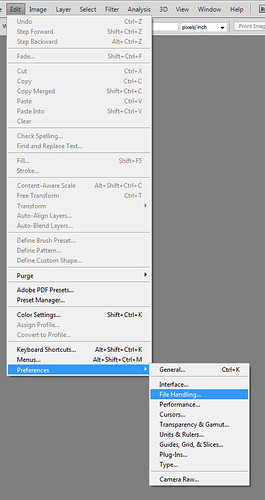
Click on the EDIT menu and go down to preferences and than to File Handling as shown below:
cam_raw2

Step 2:

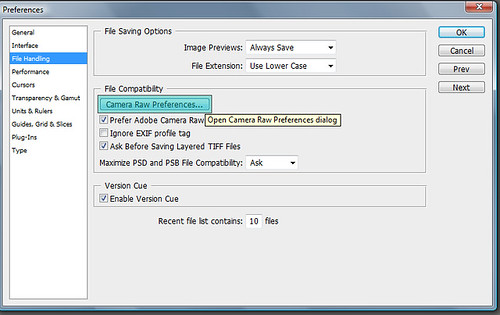
Preferences dialogue box will appear. Click on the "Camera Raw Peferences..." button as shown below:
cam_raw3

Step 3:

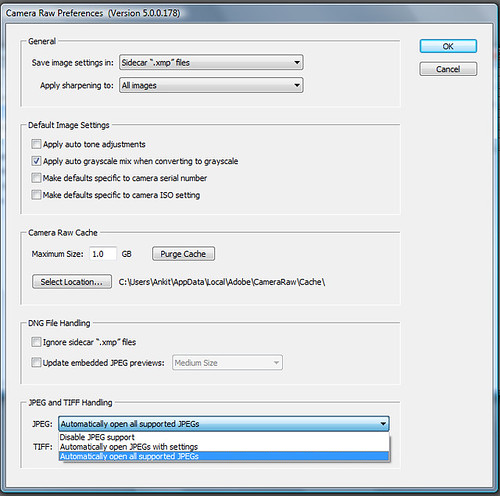
Change the option for JPEG and TIFF handling to: "Automatically open all supported Jpegs" and click OK as shown below:
cam_raw4

And that's all you have to do. Now when you open up a JPEG the camera raw 5.0 interface will open and you can quickly change the exposure, backlight and all the rest of the functions available and save your image. No need to play around with curves and levels.


Saturday, 18 July 2009

Music Video Made with SketchUp

Seems a Canadian musician named Dave Righton had an idea for his video, used SketchUp to storyboard the video, then ran out of money to get it produced. So for about $14, he just did the whole thing himself in SketchUp (plus a bunch of extra video effects).


A whole pile of SketchUp 7 books

Books about Google SketchUp 7 are popping up everywhere. Without making any recommendations, and in order of publication from most to least recent, here are some of the ones that are available now:

Google SketchUp: The Missing Manual
by Chris Grover
Beginner/Intermediate
Published June 2009 | List price $34.99
Available from: O'Reilly | Amazon | Google Product Search


Google SketchUp Cookbook: Practical Recipes and Essential Techniques
by Bonnie Roskes
Intermediate/Advanced
Published May 2009 | List price $49.99
Available from: O'Reilly | Amazon | Google Product Search


Google SketchUp 7 For Dummies
by Aidan Chopra
Beginner/Intermediate
Published March 2009 | List price $24.99
Available from: Wiley | Amazon | Google Product Search


Google SketchUp 7 Hands On: Basic Exercises
by Bonnie Roskes
List price $71.95 (color) & $57.95 (black & white)
Available from: 3DVinci


Google SketchUp 7 Hands On: Advanced Exercises
by Bonnie Roskes
List price $67.95 (color) & $54.95 (black & white)
Available from: 3DVinci


And that's not all, folks. There are at least two more publications coming down the line:

Google SketchUp for Site Design:
A Guide to Modeling Site Plans, Terrain and Architecture

by Daniel Tal
Scheduled for Publication: August 17, 2009 | List price $49.95
Available from pre-order from: Wiley | Amazon | Google Product Search


Real World Google SketchUp 7
by Mike Tadros
Scheduled for publication: November 9, 2009 | List price $49.99
Available for pre-order from: Amazon | Google Product Search

Via google


Friday, 17 July 2009

IGN: The 10 Best Game Engines of This Generation

IGN: The 10 Best Game Engines of This Generation


Unique type of photography: Trey Ratcliff


Trey Ratcliff describes the photo walking tour planned for August 6, explains how he makes money with his website while still sharing his work for free and reflects on the impact of his blindness.. Read More


Thursday, 16 July 2009

Revit Architecture 2010 Review by AEC


This review explores the capabilities in the new release of Revit Architecture, including its brand-new ribbon interface, improved conceptual modeling, and performance and interoperability enhancements:

This year’s annual release of Revit Architecture marks the first time in the history of the application that its interface has been dramatically changed from the time it was first released in April 2000.

Read More at AEC

Wednesday, 15 July 2009

nXtRender Rendering Engine for Google SketchUp


Render Plus Systems has released a new add-on Rendering Engine for SketchUp. nXtRender, which is based on the new AccuRender nXt rendering engine from McNeel and Associates, is powerful, easy to use and fully integrated into SketchUp. By defining reflection, lighting, transparency and materials in their models, SketchUp users can quickly and easily create photorealistic renderings.

Read More


Visit www.renderplus.com for more information and to download the free trial software.

Via CGarchitect

A Sharp-Looking Green Ventilation System : Artica

Artica, a project developed by a group of designers supported by Design London and funded through NESTA, is a natural cooling and ventilation system for interiors that incorporates creative design while remaining almost wholly sustainable. Recently prototyped with trails underway for mass production, Artica will use less than 10% of the energy your conventional HVAC system uses. Visually incorporative, the design quality of its sleek and modern frame is only enhanced by the fact that it was deliberately designed to utilize re-used bi-products from other industries. Needless to say, anything that saves the earth while retain a rigorous design standard is okay in my book.

artica00 A Sharp Looking Green Ventilation System : Artica

artica01 A Sharp Looking Green Ventilation System : Artica

artica02 A Sharp Looking Green Ventilation System : Artica

Via freshome

Tuesday, 14 July 2009

HDR Meets After Effects

High Dynamic Range (HDR) photography brings out the full vibrancy of urban images. Brian Przypek has combined HDR with After Effects with notable results:

Popout

HDR Meets After Effects from Brian Przypek on Vimeo.


Brian is a Cinematographer, Photographer, HDR Enthusiast, check out red-shooter.com for more of his work.

Via Digital Urban

Monday, 13 July 2009

Google to Launch Operating System


Google (Google)
has always been in heated competition with Microsoft. We thought that the competition was becoming hot again when the company behind the dominant Windows OS launched their new search engine Bing (bing) with much fanfare. But that may be nothing compared to the bombshell Google just dropped.

Google announced on their blog tonight that they’re releasing an operating system: Google Chrome OS. While the company already has a mobile operating system in Android (Android), this new one will be based off of Chrome (Chrome), Google’s web browser.

According to Google, the open source OS will be available later next year and is primarily targeted at netbooks to start. From the Google blog:

“Google Chrome OS is an open source, lightweight operating system that will initially be targeted at netbooks. Later this year we will open-source its code, and netbooks running Google Chrome OS will be available for consumers in the second half of 2010. Because we’re already talking to partners about the project, and we’ll soon be working with the open source community, we wanted to share our vision now so everyone understands what we are trying to achieve.”

It is designed to be a lightweight system, just like the Chrome browser. Unfortunately, Google didn’t divulge many other details, and it will be a while until anyone gets their hands on it. Clearly though, Google’s setting the stage for a major battle with Microsoft. Just as Microsoft is trying to break Google’s stranglehold on the search engine market, Google may be trying to do the same with the Windows-controlled market.


Via Mashable